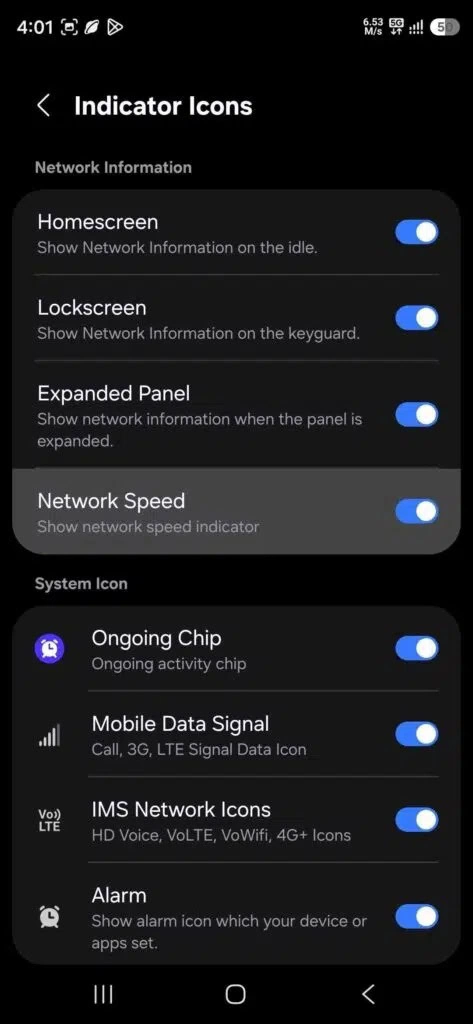
Samsung One UI 9 is expected to fill in a small but long-requested Galaxy feature: a real-time network speed readout in the status bar. According to a June 11 report from SammyGuru, Samsung is adding the option through an updated QuickStar module inside Good Lock.
This doesn’t appear to be a built-in system switch in the main Settings app. Galaxy users will need to update Good Lock, open the QuickStar module, go into the indicator icon menu, and manually turn on the network speed indicator. Once enabled, the phone can show the current connection speed directly in the status bar.
Good Lock is Samsung’s deeper customization platform for Galaxy devices. It’s made up of separate modules that let users adjust parts of the interface beyond the standard One UI settings. QuickStar is one of the core modules in that system, focused mainly on status bar controls and Quick Settings panel customization.
The updated module isn’t only about network speed. It also adds an Ongoing Chip option tied to Now Bar controls, letting users manage live activity-style information in the status bar, such as timers, incoming or outgoing calls, and voice recording status.
The detail matters because many Android phones have offered a native network speed indicator for years, while Samsung’s One UI has left the feature out by default. For some Galaxy users, that made a basic visibility tool feel oddly missing, especially for checking whether mobile data or Wi-Fi is actually moving.
With Samsung One UI 9, the gap is finally being addressed, though it still takes an extra Good Lock step instead of appearing as a standard system toggle. For users in the U.S. who already rely on Good Lock to tune their Galaxy phone, the new QuickStar option should be a simple upgrade rather than a major change.